Another look at image formats
Building a static website: part 14
 11-SEP-2026
Table of Contents
- Image editing software
- Image formats
- 2.1 Input formats
- 2.2 Editing formats
- 2.3 Exporting and archiving formats
- 2.4 Display formats
- 2.4.1 Some things to bear in mind
- 2.4.2 WebP versus AVIF
- 2.4.3 JPEG XL versus AVIF and WebP
- Comparison of display formats using specific images
- 3.1 Objectives and methodology
- 3.1.1 Methodology
- 3.1.2 The RAW pebbles image
- 3.1.3 File size comparison
- 3.1.4 Image quality comparison
- 3.1.5 Pebbles image with quality = 20
- 3.1.6 Pebbles image with quality = 40
- 3.1.7 Pebbles image with quality = 60
- 3.2 The JPEG house over the River image
- 3.3 What about screenshots?
- 3.1 Objectives and methodology
- Conclusions and design decisions
In the previous blog post, I introduced the Dragon Doc text format, which amongst many other things, includes support for the display of images. In this blog post, I want to go back to the subject of image file formats, which I did look at briefly in an earlier blog post. This time, I want to do some more detailed analysis, considering image capture, editing and display.
Before continuing, it is worth bearing in mind a couple of very high level points about images and image formats, that will be guiding me:
- Image file size can be considerable, dependent on the size they have. This can be particularly significant for displaying them on mobile devices.
- There are loads of image file types available, such as JPEG, PNG and WebP, making the choice of a particular one difficult.
I suppose it might be worth mentioning that, although images are seen as an essential part of so many web sites, there is a price to be paid for using them, which includes everything from the time it takes to obtain and process them and the myriad problems when it comes to actual display (which I will be returning to in future blog posts).
1. Image editing software
Although I intend to cover the subject of image acquisition, editing and publishing in one or more later blog posts, I think it is relevant to give a brief summary of the image editing software that I tend to use. I've had to use some of those mentioned below to help prepare the images for this particular blog post.
- For my main desktop bitmap image editor, I use Gimp. It's free (in both senses of the word), powerful and crucially, is fully Linux friendly.
- I use Gwenview as my main image viewer and occasionally for straightforward editing tasks. It is the default application for the KDE plasma desktop.
- For creation and manipulation of vector format images, I use a combination of Inkscape and LibreOffice Draw. In terms of capabilities, Inkscape's the most comprehensive, but LibreOffice Draw is something I have been familiar with for a long time and often find it easier to use.
- For command line editing and use in various bash scripts for image conversion and so on, I make use of the ImageMagick suite of tools. It can do just about everything that you might want for non-interactive purposes. Note, there is also the alternative GraphicsMagick, which was originally a fork of ImageMagick and claims to have some advantages, although none that likely affect me, at least at the moment.
- For conversion of other image formats to AVIF, there is the avifenc command. ImageMagick can be used to perform such a conversion, but it doesn't appear to be anywhere near as effective as avifenc (as I may explore in more detail later on).
2. Image formats
As I said earlier, I have looked into some of the various image formats in an earlier blog post, but I want to dive into this subject again, because it is very important and potentially affects decisions that would be difficult to change again in the future.
First of all, I'm sure that most people will be aware that there are two major classes of image, vector and bitmap (or raster), with the latter arguably being the most commonly used on webpages, at least outside the use for icons. The reader can look up the linked articles (or search elsewhere) for more details, but roughly speaking:
- Bitmap (raster) images are intended for detailed/photographic style graphics and can potentially have very large file sizes (of varying enormously depending on a number of circumstances).
- Vector images consist of graphics primitives such as lines and circles. They are typically used for diagrams and icons, not for photographic style realism. They can have relatively small file sizes and can be zoomed in and out without loss of clarity to an arbitrary extent.
One way I think about image formats is to divide them into the types of things that they are best suited for. I also think about input and display formats – i.e. the image formats that you would typically acquire your images as (input) and those that you would use for actual display on webpages. In addition, we can also think about editing and archiving formats. So, this might look like the following for a number of common (and less common) formats.
| Format | Input | Editing | Display | Comments |
|---|---|---|---|---|
| XCF | No | Yes | No | Gimp native format. Main focus is editing, although could be considered for archiving, to preserve all the applied Gimp features. |
| JPEG | Yes | No | Yes | Probably the most common bitmap image format. |
| HEIC | Yes | No | No | Native image format for iPhone. |
| PNG | Yes | No | Yes | A very common lossless image format. |
| TIFF | Yes | No | No | Huge file size, good for archiving. |
| RAW | Yes | No | No | Best quality, huge file sizes, multiple formats. |
| WebP | Yes | No | Yes | Much smaller file sizes than JPEG, can be alternative to PNG |
| AVIF | Yes | No | Yes | Potentially smaller files than WebP. Supported by modern browsers. |
| JXL | Yes | No | Yes | Claimed to have a number of advantages over other bitmap file formats, but browser coverage seems poor at the time of writing (30-JUL-2026), although that is changing quickly. |
| SVG | Yes | Yes | Yes | Essentially the only game in town when it comes to vector format images, at least as far as the Web is concerned. |
2.1 Input formats
I want to go into some more detail about input formats, which I'm defining as image file formats that you might obtain from your phone, camera, image website, screenshot tool and so on. This typically includes file types such as JPEG, PNG and RAW. There are of course plenty of other image formats (some websites increasingly seem to serve WebP or even AVIF), but these are the ones I want to quickly talk about. Note that once again, I am looking at this from my own perspective.
It's worth noting that the file sizes of formats that I consider as input formats can end up being very large. However, I don't consider this to be a major issue, because I have plenty of disk space and I'm not (generally) using these to actually display images on webpages (which is the point).
- JPEG. This is pretty much a ubiquitous format. Like a lot of people, most of the photos I take these days are on a smart phone (iPhone) and I download these to my Linux machine as JPEG images, so that's the majority. They are of course supported by every image editing and display software, so I'm usually happy to use them as a source image format.
- HEIC. I thought it was mentioning the HEIC file format, which is effectively the native format for the iPhone (there is also the ProRAW format, but you have to have an iPhone 12 pro or later to take advantage of that). If you use Linux, specifically Fedora Linux as in my case, this may well not be supported out-of-the-box. I have only very recently added what is needed to support it, so I will be looking into this further. Finally, there is a handy comparison of JPEG and HEIC, which indicates smaller file sizes for HEIC, alongside slightly better quality.
- PNG. The main use I have that these is for acquiring screenshots. The screenshot tool that I use outputs in PNG format. This is good, because screenshot images are the ones most likely to benefit from avoiding the visual artefacts that can come from JPEG images. Also, screenshots are often somewhat smaller in pixel size than bitmap images.
- RAW. This covers the multitude of often proprietary file formats that are typically available from interchangeable lens SLR cameras. In my case, I own a couple of Canon cameras, which can output to CR2 and CR3 formats. These are definitely input only formats, because they naturally need to be converted into something more useful for editing. I don't use my Canon SLR cameras very much these days, but that could change again in the future.
- TIFF. I use this file format when I scan images, because the software I use has this as it's supported lossless format. I therefore tend to choose that rather than JPEG, thereby leaving me with the most flexibility when it comes to editing and archiving.
2.2 Editing formats
In my case, I define editing format as the native file format for the image editing software that I use. From that perspective, the main one of interest for me is XCF, which is the file format used by Gimp. These files may also suitable for archiving purposes, because of course they retain all the details of the image, including any layers and so on that have been defined. Having said that, I recall that Gimp developers don't consider xcf to be a particularly good archiving format in general and a new proposed file format for Gimp is on the horizon. In addition, other bitmap image formats supported by Gwenview can be directly edited in the same format, which is useful for straightforward edits such as cropping. More on that kind of thing later.
2.3 Exporting and archiving formats
When I talk about an "export" format, I'm talking about a suitable file format that can be used for further processing, specifically by command line, because this is required, as will be covered in a later section. As far as an "archive" format is concerned, this would be the file format we use to keep the image long term (potentially allowing further changes in the future).
What file formats to use for exporting and archiving purposes depends on a number of things, which includes what the input file format was and whether any editing is required in the first place. For example, if a JPEG image is downloaded from the camera and is considered to be suitable for use without any further photo editing, then JPEG could effectively be both the export and the archive format. On the other hand, if you've downloaded that same JPEG, then edited it in Gimp, you would likely save it in Gimp's native XCF format. It could then be exported as a TIFF or PNG image, which allows further command line processing as necessary. In fact, PNG is an example of something that could easily be an input, export and archive format, due to its lossless compression.
2.4 Display formats
This is where things could become particularly complicated.
Considering the file format to use to actually display sizeable bitmap images on a webpage is of course very important, because this is what users will actually get to see. Ideally, you want something that combines excellent visual quality, great file size compression and wide support. In addition, support for transparency is also useful. There would appear to be at least three file formats that would tick most or all of the boxes: WebP, AVIF and JPEG XL, although as discussed briefly earlier on, the latter has relatively weak browser support.
Putting aside SVG for a moment, it would be really handy if there was one display format that I could use, at least in the great majority of cases. Given this, it seems like a good idea to evaluate whether that might be either JPEG XL, WebP or AVIF.
Note that it is worth also taking JXL into account, because if it was theoretically a significantly better format, then there are ways of getting round the issue that few browsers currently support the format. Dynamically generated websites (probably most of them these days) can likely use browser detection to serve different formats, depending on support levels, but even a static website can do something similar, by the use of <picture>, although this adds some significant extra complexity, so really would have to be worth it.
I am presenting analysis of the possible display formats in more detail below, but from what I can gather so far, the prevailing wind appears to be moving in the direction of JPEG XL as being the format of choice for the future. I don't think it's an easy choice to make, because as I've intimated, although it is possible to support multiple formats from a webpage, that's more difficult for me than it might be for a website based on serving webpages dynamically. However, it is worth having some facts to hand.
Some image formats supported by your browser
One thing that I thought would be interesting is to indicate the level of support for some current image formats in whatever browser you (the reader) is using to view this page. The list below includes HEIC, which although I'm not intending to use, is supported on Safari browsers, at least on iOS and iPadOS. It does give an easy visual reference.
Note that I haven't included PNG and JPEG, because every graphical browser can be assumed to support them!





As a side note, when I added a test for display support of TIFF images, it raised an error on iOS and iPadOS! Hence, I decided to leave that out.
2.4.1 Some things to bear in mind
Before diving into some analysis of what to use for a display format (all formats), I think it's worth thinking about the type of website I'm constructing and who I might imagine the audience of that website to be. The answers to those questions might well affect the strategy when it comes to display formats.
For instance, this website is constructed and maintained entirely by myself and is therefore just a small personal project, which is likely to remain so. I am therefore aware that there is a distinct possibility that almost no one will actually ever read what I'm writing! If for some reason, you are a person who has stumbled across this site, then welcome, but I'm never going to know. The consequence of that might be that from my perspective, I might tend to favour simplicity over the maximum file size saving. If I were considering this could be a huge website, saving space would be considerably more important.
As this website will also only ever post a restricted number of articles, I'm not necessarily constrained by the amount of disk space that I have. This means if I did decide that multiple display formats were appropriate, I wouldn't be put off by being overly concerned by the extra disk space required on the server.
In terms of the audience, it's extremely difficult to make any kind of assumption, but as this is my own project, I'm relatively unconcerned about having to support every device out there. I think it's quite reasonable that I could just target the main browsers and platforms, so maybe I don't need to support more than one reasonable format. Of course, as I have noted elsewhere, one of the browsers that I use heavily in website development is Seamonkey browser, which just so happens not to support AVIF (or JPEG XL)!
There is also the more general point about website audiences. I haven't read anything about this in particular, but I imagine that the vast majority of people who visit websites are not particularly concerned by exactly how good displayed images actually look. That might not be the case where the photography itself is important, but I'm guessing that for most of the illustrative images, people might do no more than a glance at them. If I'm correct, then this might well mean that the slight visual quality advantage of one display format over another may well be entirely irrelevant. Also, in the cases where it might be important, I suppose it could be possible to provide a direct download of a higher quality image, in a suitable format.
2.4.2 WebP versus AVIF
Naturally, there are plenty of websites in existence that have articles about the pros and cons of WebP versus AVIF. One of the top hits that made for a particularly good comparison is WebP vs AVIF in 2026: Which Format Should You Actually Use?. A few of the major points include:
- AVIF has superior compression in most scenarios.
- AVIF supports alpha transparency for lossy images, whereas WebP doesn't.
- Converting other image formats into AVIF is significantly slower than WebP.
- AVIF needs more CPU power to decode on the client, which could be a problem for low-power android devices.
- Browser support for WebP is essentially universal, while there are few gaps in support for AVIF.
2.4.3 JPEG XL versus AVIF and WebP
There is of course the relatively recent gatecrasher to the party: JPEG XL. This was developed by the group that developed JPEG, indeed that's where it got its name, Joint Photographic Experts Group. This is worth looking at, because it appears to have a number of potential advantages over both WebP and AVIF.
The summary appears to be that, pound for pound, JPEG XL can often beat both WebP and AVIF, both in the visual quality and file size. It also has the advantage of lossless recoding from JPEG to JPEG XL, which makes it promising from an archiving perspective. There is also a slightly more esoteric points about HDR support and higher bit depth images. The article WebP vs AVIF vs JPEG XL — Which Format Should You Use in 2026? gives a good summary.
The impression I'm left with is that JPEG XL could well be the best format to use, although its Achilles heel still appears to be browser support. Until recently, it was not well supported at all, but the situation is changing rapidly, especially since Google Chrome decided to bring back support (as far as I understand). Also, I note that the current version of Firefox at the time of writing (153) does appear to support it.
I also note from the Wikipedia article about JPEG XL, that The Guardian has said that this is their preferred format, so that is a vote from a major website (that I happen to read). Naturally, other websites are available as they say.
3. Comparison of display formats using specific images
I thought it might be interesting to get a few answers for myself, by using a couple of specific images and then converting those images into a number of different output formats, at differing image sizes and output settings (for compression and so on), then compare the file sizes and apparent visual quality. As I'm interested in visual quality and not just file sizes, I thought it would make sense to use a couple of different images.
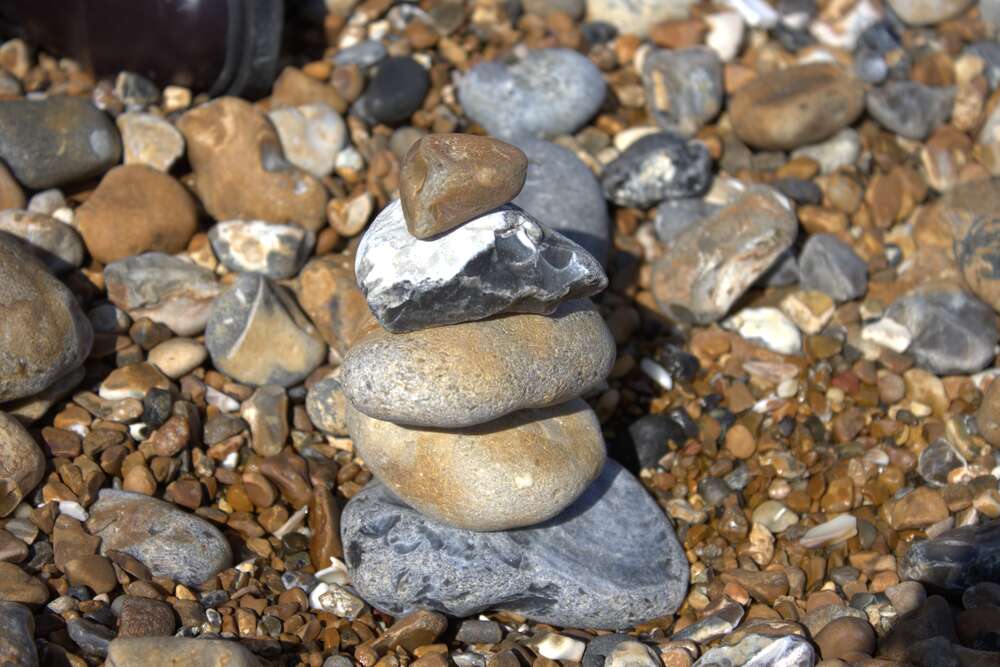
- A close-up shot of pebbles on Brighton beach, taken on a Canon Eos 90 D and shot in RAW, resulting in a file that was 38.4 MB, with reported dimensions of 6960 x 4640. For the purposes of this exercise, I renamed it to pebbles.CR3.
- A shot looking across the River Thames, not too far from where I live, taken on an iPhone, resulting in a file that was 5.6 MB and with dimensions of 4032 x 3024. As the vast majority of photos I take (at least currently) are taken on this iPhone, this represents a typical scenario, where the image is already compressed to a JPEG file when downloaded.
As a general point, I think this kind of investigation is useful on the one hand, but also rather difficult, because there are potentially so many things to take into account, where there will be an endless set of compromises between file size, compression and perceived visual quality.
3.1 Objectives and methodology
I've already hinted at some of the objectives earlier, but I think it's worth talking about those in more detail. Essentially, I want to get an idea of the compromise between image size (i.e. the width of the image in pixels), against the perceived visual quality at various compression levels, alongside the actual file sizes that are generated by different display formats. Based on that, I can then consider other factors that might lead me to a conclusion on one specific display format using particular quality settings, or perhaps more than one, depending on the circumstances.
3.1.1 Methodology
There are any number of ways that I could have approached this, but in the end I decided that I would write a bash script that would take each of the images and then resize them to a number of different image widths, using three different compression/quality settings and outputting them into the four different potential display formats: AVIF, JPEG, JXL and WebP.
I resized each image to quite a wide range of sizes, which both represent the typical sizes of an image that would be displayed on a webpage, all the way from very small thumbnail size (100 pixels), all the way to the maximum original width of the image.
In terms of the compression/quality settings, I made a fairly arbitrary decision to set this to 3 different values: 20, 40 and 60. For me, this represents highly compressed (20), quite compressed (40) and medium compression (60).
I wrote a bash script to perform the conversion. For everything except AVIF, I used the ImageMagick command line. For AVIF, I used the avifenc command, because although ImageMagick can perform the required conversion, when I was trying it out, the resultant image file was massively bigger than using avifenc, so I ended up using that. Perhaps there is something I'm missing, but I figured that there was no point in spending too much time on it.
In terms of the visual quality, I then looked at some of the converted images and try to assess those in terms of quality, both at the size that they would be displayed at and when zoomed in. I guess one of the things that I'm looking for is whether you can reasonably tell a difference at the display size. If you can, is it to the extent that anyone would likely notice, which strikes me as being quite important. After all, as I said earlier, I suspect that most people do not do more than glance at most images. That might not be the case for some circumstances, such as the display of photographic images for their own sake, but that's another thing to bear in mind, in terms of the particular circumstances in which an image is being displayed.
There are some other things that are potentially worth bearing in mind, which might include:
- Some image sizes are likely to be more important than others. For example, if the majority of images displayed on the website were 800 pixels and 1000 pixels, then the file sizes and/or visual quality of those image widths would seem to be the ones of most concern (perhaps alongside other sizes are likely to be displayed on HiDPI monitors).
- Although more compressed version of an image might be visibly worse than a less compressed version, I suspect that many people would not notice this, or be able to really notice, unless they have the two images to compare side-by-side. Therefore, higher compression might not be such a big deal in many situations.
- An extension of the previous point is that, in cases where thumbnail images are displayed, the small size may mean that it is even more difficult for people to tell between more and less compressed version, unless a user zooms in deliberately. Therefore, perhaps thumbnail size images (for example 200 pixels or less), might be worth compressing more. However, the small size will then only provide a small benefit in terms of the file size.
3.1.2 The RAW pebbles image
Because the conversion of RAW image files into other file types may not be supported directly in all cases, I decided that I would start by converting this image into a PNG file, which of course is lossless and can be easily converted into other formats as necessary afterwards. Therefore, I used the following command line, which is part of the ImageMagick toolset:
magick pebbles.CR3 pebbles.png
This resulted in a file that was 153.9 MB in size (which the astute amongst you might note is considerably larger than the RAW file that it comes from, I don't know why). Another interesting thing is that the reported dimensions of the image are slightly different to the RAW file, measuring 6984 x 4660. Again, I have no idea why. I'm guessing it's not significant though. In summary, the starting conditions for my tests were as follows, for the pebbles image:
| Format | Dimensions | Size |
|---|---|---|
| CR3 | 6960 x 4640 | 38.4 MB |
| PNG | 6984 x 4660 | 153.9 MB |
If you are interested, you can download the full size CR3 version of the image and the PNG version of the image, but bear in mind that they are very large images, especially that PNG version!

3.1.3 File size comparison
If you look at the file size stats below, a fairly clear trend that seems to emerge in terms of file size. At maximum compression, AVIF wins every single time and in some cases, by quite a margin. Then as the quality setting is increased, AVIF and JXL trade blows, with JXL winning at the smaller image sizes, but AVIF coming out on top as they grow larger. Finally, when you look at the sizes for the best quality setting, JXL suddenly starts knocking it out of the park and wins every single time. Note that none of the other image formats come out smaller, although perhaps surprisingly there are occasions when JPEG emerges as the winner over AVIF, which I think is interesting.
If you are just looking at the file size, if everything else was equal, it seems you would choose AVIF at high compression, probably AVIF at medium compression and JXL at the minimum compression levels used.
3.1.4 Image quality comparison
A comparison of image quality is probably significantly more difficult, because it is of course highly subjective, until perhaps it becomes strikingly obvious. Also, it depends enormously on other factors, including everything from how big your monitor is, to how good your eyesight is. In addition, there are several variables, including the image size, output format and level of compression. What should we be comparing to what?
I tried to do some comparison visually between the JXL and AVIF images, with image width of 1000 pixels, because this is the typical kind of image size that would be displayed. Very broadly speaking, if you have high compression, the JXL image is fairly obviously better than the AVIF image. However, if you perform the same comparison against the maximum quality that I used, the difference is minimal. I suppose the conclusion from this would be:
- At high compression, JXL would be the choice for better visual quality.
- At less compression levels, AVIF and JXL are pretty much the same.
- Overall, JXL seems to cope with compression better, at least at this mid-range image size.
Admittedly, if you take into account file sizes, you are effectively able to get smaller file sizes at higher compression using AVIF, but the visual quality will suffer.
3.1.5 Pebbles image with quality = 20
The number highlighted in bold is the smallest file size for that image.
| Width | AVIF | JPEG | JXL | WebP |
|---|---|---|---|---|
| 100 | 737 | 1.3 kB | 829 | 1.5 kB |
| 200 | 1.7 kB | 3.6 kB | 2.4 kB | 4.0 kB |
| 400 | 4.0 kB | 11 kB | 6.6 kB | 11 kB |
| 600 | 6.5 kB | 19 kB | 12 kB | 18 kB |
| 800 | 9.8 kB | 30 kB | 19 kB | 26 kB |
| 1000 | 13 kB | 41 kB | 25 kB | 34 kB |
| 1200 | 17 kB | 53 kB | 33 kB | 44 kB |
| 1600 | 24 kB | 79 kB | 49 kB | 63 kB |
| 2500 | 42 kB | 150 kB | 94 kB | 112 kB |
| 3000 | 52 kB | 196 kB | 123 kB | 142 kB |
| 6984 | 202 kB | 642 kB | 423 kB | 436 kB |
3.1.6 Pebbles image with quality = 40
The number highlighted in bold is the smallest file size for that image.
| Width | AVIF | JPEG | JXL | WebP |
|---|---|---|---|---|
| 100 | 1.8 kB | 1.9 kB | 1.3 kB | 2.1 kB |
| 200 | 4.5 kB | 5.4 kB | 3.5 kB | 5.8 kB |
| 400 | 11 kB | 17 kB | 9.7 kB | 16 kB |
| 600 | 18 kB | 31 kB | 18 kB | 26 kB |
| 800 | 26 kB | 47 kB | 27 kB | 38 kB |
| 1000 | 33 kB | 66 kB | 37 kB | 50 kB |
| 1200 | 42 kB | 86 kB | 47 kB | 63 kB |
| 1600 | 57 kB | 129 kB | 70 kB | 91 kB |
| 2500 | 97 kB | 246 kB | 132 kB | 159 kB |
| 3000 | 119 kB | 318 kB | 169 kB | 201 kB |
| 6984 | 386 kB | 1.1 MB | 564 kB | 599 kB |
3.1.7 Pebbles image with quality = 60
The number highlighted in bold is the smallest file size for that image.
| Width | AVIF | JPEG | JXL | WebP |
|---|---|---|---|---|
| 100 | 3.7 kB | 2.4 kB | 1.8 kB | 2.4 kB |
| 200 | 11 kB | 7.0 kB | 4.9 kB | 7.3 kB |
| 400 | 27 kB | 22 kB | 14 kB | 20 kB |
| 600 | 44 kB | 40 kB | 24 kB | 34 kB |
| 800 | 65 kB | 62 kB | 36 kB | 49 kB |
| 1000 | 85 kB | 86 kB | 49 kB | 66 kB |
| 1200 | 106 kB | 113 kB | 63 kB | 82 kB |
| 1600 | 148 kB | 173 kB | 93 kB | 117 kB |
| 2500 | 249 kB | 331 kB | 173 kB | 206 kB |
| 3000 | 307 kB | 432 kB | 222 kB | 261 kB |
| 6984 | 973 kB | 1.6 MB | 734 kB | 800 kB |
3.2 The JPEG house over the River image
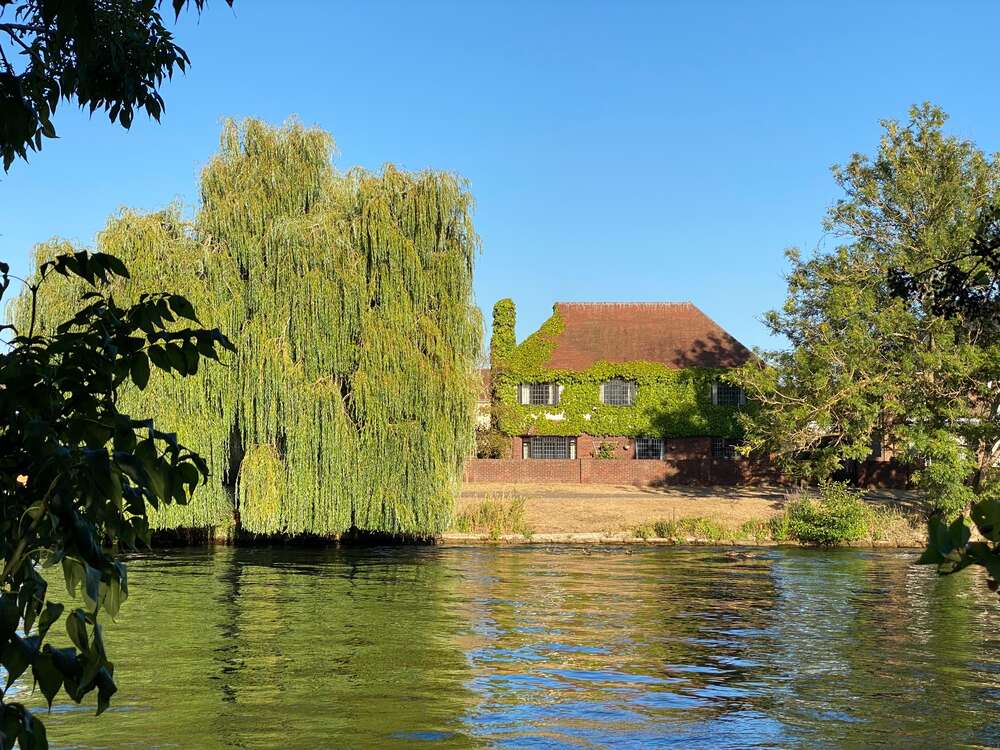
As a reminder, this image was taken with an iPhone, which I downloaded as a JPEG image, with the resultant image size of 4032 x 3024 and with whatever compression settings used on the phone, resulted in an image size of about 5.6 MB. The interesting thing here is that it represents a typical situation where compression has already been applied, so how might that affect the output at different sizes and output formats. I noted that conversion of JPEG to JXL can be performed in a "lossless" manner, although clearly you have already thrown away image information when the original conversion to JPEG has been performed.
3.2.1 File size comparison
If you look at the file size stats for this image, the pattern appears to be that at lowest quality setting, AVIF and JXL once again trade blows in terms of smallest file size, whereas for the medium and highest quality settings, JXL wins every time and often by quite a significant margin, more so over AVIF then over the corresponding WebP version for example. This is somewhat different from the pebbles image we looked at earlier, where the situation is somewhat more mixed.
3.2.2 Image quality comparison
I would have the same comments about the difficulty of comparing image quality, that I made when talking about the pebbles image. However, I did some comparison between the JXL and AVIF images at 1000 pixels, because those file formats won all the size comparisons and the 1000 pixel image size is the typical size that might be displayed on the website, at least when viewed in a desktop browser.
If you compare the two 1000 pixel images at the lowest quality setting used, they look different, although it's difficult to say which one is better. I eventually decided that the AVIF image looked better than the JXL version, which is interesting, because that's very different from the similar situation with the pebbles image, where the JXL image was obviously visually better than the AVIF.
Moving to the maximum quality setting used, the images look very similar to me, although there is a slight difference. Personally, I ended up preferring the AVIF, including when I zoomed in to a certain extent. However, I don't think I would notice, if I did not have a direct comparison.
Broadly, I would say that there is little difference between JXL and AVIF in terms of image quality, even when the compression is turned up. However, with lower compression, JXL images win on file size.
3.2.3 House over the River image with quality = 20
The number highlighted in bold is the smallest file size for that image.
| Width | AVIF | JPEG | JXL | WebP |
|---|---|---|---|---|
| 100 | 809 | 1.1 kB | 702 | 994 |
| 200 | 1.8 kB | 2.9 kB | 2.2 kB | 3.0 kB |
| 400 | 5.5 kB | 9.7 kB | 6.5 kB | 11 kB |
| 600 | 13 kB | 22 kB | 14 kB | 26 kB |
| 800 | 24 kB | 39 kB | 24 kB | 47 kB |
| 1000 | 39 kB | 63 kB | 37 kB | 76 kB |
| 1200 | 57 kB | 93 kB | 53 kB | 112 kB |
| 1600 | 105 kB | 170 kB | 98 kB | 203 kB |
| 2500 | 243 kB | 421 kB | 240 kB | 471 kB |
| 3000 | 323 kB | 494 kB | 332 kB | 643 kB |
| 4032 | 490 kB | 1013 kB | 548 kB | 1.1 MB |
3.2.4 House over the River image with quality = 40
The number highlighted in bold is the smallest file size for that image.
| Width | AVIF | JPEG | JXL | WebP |
|---|---|---|---|---|
| 100 | 1.6 kB | 1.6 kB | 1.2 kB | 1.4 kB |
| 200 | 4.3 kB | 4.5 kB | 3.3 kB | 4.6 kB |
| 400 | 16 kB | 17 kB | 10 kB | 17 kB |
| 600 | 35 kB | 37 kB | 22 kB | 39 kB |
| 800 | 65 kB | 66 kB | 38 kB | 72 kB |
| 1000 | 103 kB | 105 kB | 60 kB | 114 kB |
| 1200 | 147 kB | 153 kB | 87 kB | 166 kB |
| 1600 | 258 kB | 276 kB | 157 kB | 294 kB |
| 2500 | 566 kB | 665 kB | 369 kB | 680 kB |
| 3000 | 747 kB | 925 kB | 500 kB | 929 kB |
| 4032 | 1.2 MB | 1.6 MB | 811 kB | 1.6 MB |
3.2.5 House over the River image with quality = 60
The number highlighted in bold is the smallest file size for that image.
| Width | AVIF | JPEG | JXL | WebP |
|---|---|---|---|---|
| 100 | 3.1 kB | 2.0 kB | 1.5 kB | 1.9 kB |
| 200 | 9.4 kB | 6.0 kB | 4.5 kB | 5.9 kB |
| 400 | 35 kB | 22 kB | 15 kB | 23 kB |
| 600 | 75 kB | 50 kB | 31 kB | 51 kB |
| 800 | 133 kB | 89 kB | 53 kB | 92 kB |
| 1000 | 203 kB | 141 kB | 84 kB | 145 kB |
| 1200 | 286 kB | 205 kB | 122 kB | 211 kB |
| 1600 | 496 kB | 366 kB | 216 kB | 373 kB |
| 2500 | 1.1 MB | 866 kB | 501 kB | 861 kB |
| 3000 | 1.5 MB | 1.2 MB | 678 kB | 1.2 MB |
| 4032 | 2.3 MB | 2.0 MB | 1.1 MB | 2.0 MB |
3.3 What about screenshots?
As a "bonus feature", I thought it would be worth thinking about screenshot images. Of course, a screenshot is essentially a bitmap image like anything else and so the obvious question is why am I talking about this separately? The reason is that screenshots, at least under the circumstances that I tend to use, have a number of properties that make them significantly different from typical bitmap images such as photographs. That could mean that are different to display format, or a display format with different settings might be optimal for such things. The sort of properties I have in mind are:
- The images in their original state tend to be smaller in image width than the typical photo. For example, a photo downloaded from my iPhone has a width of 4032 pixels, whereas a screenshot will most often be significantly less than that, because you are usually taking a screenshot of a small area currently displayed on the monitor.
- Screenshots tend to have more uniform areas of whitespace or colour than a typical detailed photos.
- Screenshots will very often display text.
The first two properties together lead to image file sizes that are significantly smaller, whereas the final one makes the quality of the image potentially a bit more important than a typical photo, because it's very easy to see when text looks blurred. I didn't want to spend too much time looking at this, but I did quickly take a screenshot of something and perform a quick comparison between the formats and at different quality settings.
Thinking once again about the screenshot resized to 1000 pixels, my very brief conclusion is that the difference between the file sizes is very small and they are not very large from an absolute point of view (not exceeding around 30 kB, depending on the quality setting). The big difference is the image of visual quality, between the lowest quality setting (20) and the highest I have been using for these evaluations (60). Text is significantly more blurred at the lowest setting than the best. It's hardly a disaster, but indicates to me that the highest quality setting seems appropriate and the particular display format is a secondary consideration.
4. Conclusions and design decisions
In this blog post, I have looked at image file formats from several perspectives, including:
- What stage in a typical workflow are we talking (image capture, editing, archiving or display).
- For image display, is there a particular image format that wins against the others, when we look at the various considerations, such as image type, size and compression/quality setting.
- For the display of screenshots, does this change is the potential outcome?
4.1 Input, editing and archiving formats
As far as this is concerned, we can say briefly that:
- For input, this is most likely to be JPEG, PNG (or SVG for vector images). Things are often constrained by what is available: for example, I am (currently) downloading iPhone photos as JPEG, while screenshots are PNG. Image download sites will often be JPEG, whereas other websites may vary.
- For editing, at least for anything more sophisticated than just cropping or resizing, this will mean XCF (because this is the native Gimp format).
- For archiving, depending on the circumstances, this might be XCF, or potentially PNG or TIFF. However, it could even be JPEG, because that might be the best quality of image to start with and if it didn't need any editing, you might as well keep it in the same original format.
Naturally, the precise details depend on the circumstances and particular workflow. I intend to look at that in a future blog post.
4.2 Display formats
In some ways this could be seen as relatively straightforward to make a decision about. After all, excluding SVG for a moment, they really are only a few formats that make any sense: PNG, WebP, JPEG and JPEG XL. However, exploring further, there are a number of things to take into consideration.
Without re-litigating the arguments that I made earlier in a great deal of detail, the main conclusion that I have come to is:
If all browsers supported it, it would be quite tempting to use JPEG XL, because overall, it has a good combination of characteristics, especially if the quality setting is the highest that I used in my tests. However, as I pointed out elsewhere, this format is not yet universally supported, although that situation is changing fast. Hence, a more universal alternative is AVIF.
Having said all that, if I were to choose either JPEG XL or AVIF as the one display format, this means that a number of browsers, including somewhat ironically, the Seamonkey browser that I personally use as part of my development process, would be unable to display these images! Generally, this doesn't really matter, because realistically, only a very small number of people are likely to ever read this website anyway, so perhaps I can please myself. However, my intention when designing this website was to imagine (however naïvely) that perhaps a number of other people would stumble across what I'm writing, so that affects the decision.
4.3 Design decisions
Based on all of the above, let's consider where we are. First of all, I'm going to make a starting, somewhat arbitrary decision about quality/compression levels. Earlier, I looked at those two images, with a quality setting of either 20, 40 or 60. To maintain a balance between file size and overall quality, I think I will stick to the quality setting of 60, which is in itself a medium setting.
Based on this, from a file size perspective, JPEG XL beats all the other file formats and the perceived visual quality is a tossup, as far as I can make out.
Therefore, if JPEG XL was supported to the same extent that AVIF was, it would seem that the former would be the single image format to use. However, that is currently not the case, with even such browsers as Opera (version 135 at the time of writing) not currently having support. That situation is likely to change relatively soon, but it is clear that AVIF is still significantly better supported overall.
As a side note, neither JXL nor AVIF is supported by Seamonkey browser, but I'm beginning to think that it would be wise to move away from using that in my ongoing web development. For me, there seems to be three options to consider:
- Use AVIF as the one display format and stick to it.
- Use AVIF as the display format, but consider switching to JPEG XL at some point in the future, when it is more universally supported.
- Support multiple formats, so possibly JPEG XL can be used now, but falling back to AVIF (and possibly even standard JPEG), depending on the browser.
As far as the final option is concerned, the basic technique is to use the <picture> element, which can provide (along with lots of other things) the ability to support several display formats, with a fallback option. I've used this to display the pebbles image at the top of this blog post. In Dragon Doc format, this looks like:
Picture
SRC [images/bp14/pebbles-1000w-q60.jxl] "image/jxl"
SRC [images/bp14/pebbles-1000w-q60.avif] "image/avif"
IMG [images/bp14/pebbles-1000w-q60.jpg] [Main illustrative blog post header image.]
/Picture
Whereas the resultant HTML is:
<picture>
   <source srcset="images/bp14/pebbles-1000w-q60.jxl" type="image/jxl">
   <source srcset="images/bp14/pebbles-1000w-q60.avif" type="image/avif">
   <img src="images/bp14/pebbles-1000w-q60.jpg" alt="Main illustrative blog post header image.">
</picture>
The effect is that if you have a modern browser, it would display the JXL image, whereas if that isn't supported, the AVIF image will be displayed and if neither of those is supported (which is the case for the Seamonkey browser), there is a fallback of a JPEG image.
However, although Dragon Doc format syntax clearly has the support for this, in practice, it would be too difficult to support unless I can develop a method to generate the necessary syntax automatically.
4.4 Conclusions
It's been a long ramble along this road, but I think that in conclusion, the best thing for me to do right now is to implement AVIF as the default display format, while at some point in the future, consider switching to JPEG XL.
I don't think I'm going to implement multiple format support right away, because it is just too difficult from my initial investigations, but I could return to that in the future. Meanwhile, I've got to think about how best to implement the decision I've taken. That is a subject for a future blog post.